


Title here
Summary here
Facing key advertising challenges? Take control of your tracking: audit, optimization, GDPR compliance, CMP, Consent Mode v2, and server-side tagging.
Contact Lucas or book a discovery callLegislation
Questions about this article?
Open it in your AI assistant to summarise it or apply it to your setup.
Consent Mode is often presented as a simple compliance topic, yet it can also change the way GA4 and Google Ads measure conversions and use the available data. Between observed data, modeled data and the signals used by advertising algorithms, its impact can quickly become hard to interpret. In this article, I will focus on one specific question: what does Consent Mode really change in the performance measured in GA4 and Google Ads? What is the real impact of Consent Mode?
In short
Consent Mode does not directly improve your performance, but it can limit the data loss caused by declined consent and provide more usable signals to GA4 and Google Ads.
Before talking about the impact of Consent Mode or about performance, let’s set the scene!
Consent Mode is a mechanism provided by Google that lets Google tags adjust their behavior based on the consent choice expressed by the user.
It is therefore not used to collect consent itself. That role usually belongs to a CMP.
Consent Mode then picks up the information passed on by that CMP to tell Google Analytics 4 and Google Ads which data can be collected, stored or used. Its purpose is to connect the user’s consent choices with the way Google’s measurement and advertising tools work.
Consent Mode relies on several consent signals passed to Google tags. The main ones are:
analytics_storage, which indicates whether storage related to analytics measurement is allowed,ad_storage, which covers storage related to advertising,ad_user_data, which defines whether user data can be sent to Google for advertising purposes,ad_personalization, which indicates whether that data can be used to personalize ads.In practice, your CMP collects the user’s choice, then that choice is passed on to Consent Mode. Google tags then adjust their behavior based on the status they receive.
If the user accepts analytics consent, GA4 can work with the permissions intended for measurement. If they decline, the behavior of the tags depends in particular on the type of implementation chosen and on the configured settings.
Consent Mode therefore sits between the choice expressed by the user and the measurement tools. It carries this information to GA4 and Google Ads so the platforms know which data they can or cannot use.
Good to know
Consent Mode does not replace your cookie banner or your CMP. Google states that it must be used together with a mechanism that collects the user’s consent.
Google distinguishes two main ways to implement Consent Mode: Basic mode and Advanced mode.
This difference matters a lot for measurement: in Basic mode, Google has much less information about users who decline consent. In Advanced mode, some limited information can still be sent depending on the setup, which can give Google’s models more to work with.
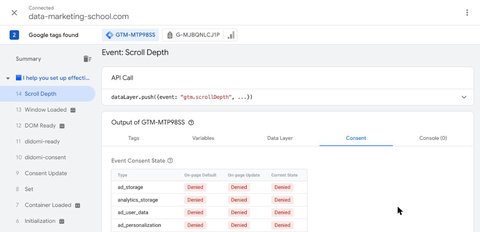
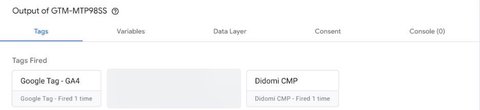
To check that your site really runs in Advanced mode, open Google Tag Manager’s preview after declining cookies. In the Consent tab, every signal should be set to Denied, and yet the Google tag should still appear under Tags Fired:
Consent Mode V2 is an evolution of Consent Mode that adds two new advertising-related parameters:
ad_user_data, to indicate whether user data can be sent to Google for advertising purposes,ad_personalization, to indicate whether that data can be used for personalized advertising.These parameters complement the existing signals, such as analytics_storage and ad_storage. In practice, Google Consent Mode V2 therefore gives Google more precise information about what the user accepts for measurement and advertising.
This is critical for Google Ads features that rely on advertising data or on personalization!
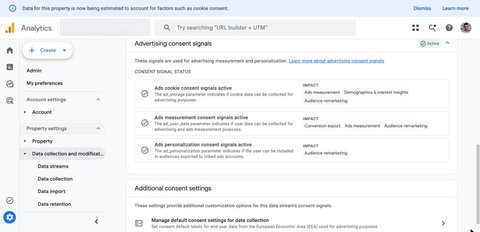
You can check that these signals are properly received in GA4, under Admin > Data collection and modification > Consent settings:
This is where Consent Mode gets interesting: it does not only change the way you manage consent, it can also change the way your performance shows up in GA4 and Google Ads.
The first impact is fairly easy to understand: not every actual conversion can necessarily be observed directly in your tools.
If a user grants the required consent, GA4 and Google Ads can measure their journey with the available signals. However, if they decline some uses, part of the information that connected a visit, an ad click and a conversion can disappear.
In practice, your site may generate 100 sales while Google Ads directly observes only 70 or 80 of them. The other sales do show up in your revenue, but they do not necessarily appear in the same way in your reports.
This matters because a measurement gap can quickly become a management problem: you may think a campaign is underperforming when part of its conversions is simply no longer visible.
That is exactly what Consent Mode helps limit! It does not create extra conversions, but in Advanced mode, it helps Google make better use of the data still available when consent is denied. In Basic mode, tags do not load before consent: Google receives no signal from users who decline and can only rely on a more generic, and therefore less accurate, model. And that is where conversion modeling comes in.
Conversion modeling lets Google estimate some conversions that cannot be observed directly.
The idea is not to rebuild the exact journey of a user who declined consent. Instead, Google analyzes the data available for users who can be measured, then uses those trends to estimate what probably happened on the unobservable part.
You will therefore find two types of conversions in this logic:
Let’s take an example: your store generates 1,000 purchases in a month. Google Ads directly observes 750 of them. With enough data and a compatible setup, the model can estimate that part of the remaining 250 purchases is driven by your campaigns. Your Google Ads account may then show more conversions than before, even though your store has not actually sold more.
This is an important point to keep in mind: an increase in reported conversions after setting up Consent Mode does not automatically mean an increase in actual conversions. You may simply have less incomplete measurement.
Good to know
Conversion modeling does not “recover” every lost conversion. Its effectiveness depends in particular on volume, data quality and your Consent Mode setup.
On the GA4 side, modeling also covers the behavior of users who decline analytics cookies: active users, sessions, key event rate… This is what Google calls behavioral modeling. But it does not automatically appear in your reports!
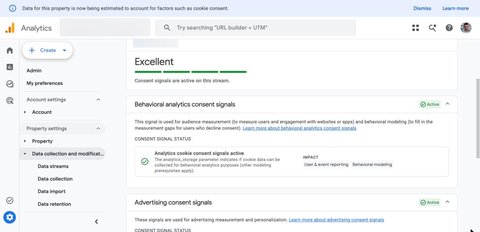
The first setting to check is your property’s reporting identity (Admin > Data display > Reporting identity). Modeled data only appears if the Blended option is selected. With Observed or Device-based, GA4 only shows the data that was actually observed, even if your Advanced Consent Mode is perfectly configured.
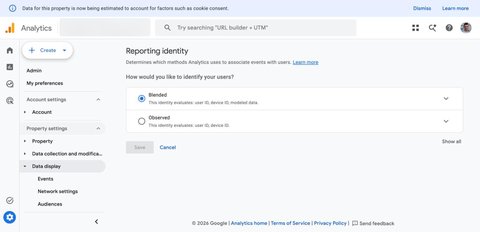
Be careful, though: choosing the Blended identity is not enough. Modeling can very well stay inactive if your property does not have enough data to train the model. According to Google’s documentation, your property must in particular:
analytics_storage set to denied, for at least 7 days,analytics_storage set to granted, for at least 7 of the previous 28 days.And even when these thresholds are met, eligibility is not guaranteed: Google applies additional quality criteria (ratio of new to returning users, number of sessions per user…) and only enables modeling once it considers the model reliable enough.
Finally, even when it is active, modeling does not apply everywhere in GA4. Modeled data is missing from several features:
That is why you may see more users in your standard reports than in BigQuery or in an audience size: those tools only contain observed data.
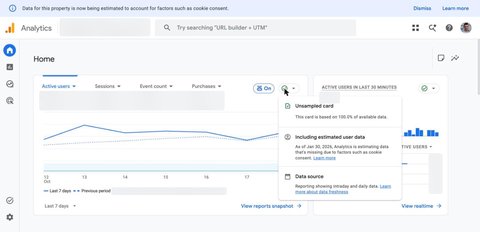
My advice
If you see no difference in GA4 after setting up Consent Mode, look at the data quality icon (the green check mark at the top of your reports and cards). It tells you whether the report includes estimated user data, whether your reporting identity prevents it, or whether your property does not meet the eligibility criteria. On a low-traffic site, it is perfectly normal for modeling never to kick in.
The benefit does not stop at reporting. Conversion data also feeds Google Ads automated bidding systems. Maximize conversions, target CPA, target ROAS: all these strategies make decisions based on the signals available in your account!
If a large share of conversions disappears from measurement, Google Ads learns with an incomplete view of what really works. Some campaigns, audiences or search terms may then look less effective than they actually are.
With conversion modeling, Google can have more signals to interpret campaign performance. In theory, this can help the algorithms adjust bids better and make better decisions. But be careful: a well-performing Consent Mode does not mean a well-performing campaign.
If your tracking is poorly configured, if you measure the wrong conversions or if your account lacks volume, Consent Mode will not solve the problem on its own. Above all, it improves the quality of the reading and of the available signals. Actual performance still depends on the structure of the account, the campaigns, the bids and the quality of your data.
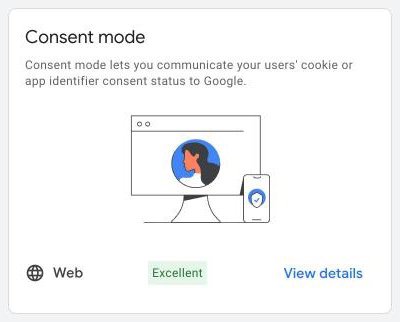
On the Google Ads side, the conversion diagnostics (Goals > Summary > Diagnostics) tell you whether Consent Mode is properly detected on your site:
This is where you need to avoid a shortcut that is a little too quick: measuring better does not necessarily mean performing better.
Consent Mode can increase the number of conversions reported in your tools, but that does not mean your business suddenly generates more sales, leads or revenue.
The difference mostly comes from the way performance is measured.
Imagine a campaign that actually generates 100 conversions. Without a properly configured Consent Mode, Google Ads may only identify 70 of them. Once it is in place, and thanks to modeling, the platform may manage to attribute more of them to the campaign. In your reports, performance improves. Yet on the business side, the number of actual conversions has not changed.
That is why you need to clearly distinguish:
Consent Mode mainly acts on the second one. But that does not make it useless.
Better measurement can actually help you avoid bad decisions on your campaigns. If Google Ads systematically underestimates some conversions, you risk cutting a lever that works or moving budget to a campaign that only looks better because it is better measured.
My advice
Never look only at how the number of conversions in Google Ads changes after setting up Consent Mode. Also compare it with your business data: orders, CRM leads, revenue or transactions actually recorded.
Consent Mode is not magic. In some setups, its impact on performance will remain small. This is especially the case if you have very little traffic or very few conversions. Models need a minimum amount of data to work properly, so a small volume necessarily limits what they can estimate.
Same problem if your tracking is flawed to begin with. A badly triggered purchase event, duplicate conversions or an incomplete tracking plan will not be fixed by Consent Mode.
The consent rate also plays a big role. If the vast majority of your users already accept cookies, the potential gain from modeling will necessarily be smaller. Conversely, a high refusal rate can create more gaps in measurement, but you still need enough reliable data to model them properly.
Finally, the impact may be limited if you do not really use Google Ads automation. A manually managed campaign will benefit less directly from extra signals than a campaign that relies heavily on Google Ads automated bidding strategies.
In short, Consent Mode is mostly useful when it is part of tracking that is already clean, with enough volume and properly defined conversions. Without these foundations, the gain will necessarily remain limited.
Consent Mode will not turn an average campaign into a conversion machine. Its value lies elsewhere: reducing blind spots in measurement and giving GA4 and Google Ads a more complete view of performance. When it is properly configured, with clean tracking and enough data, it can improve reporting quality and provide better signals to advertising algorithms. But keep one thing in mind: more conversions in your reports does not necessarily mean more conversions in your business.
A question about this article, need an audit of your setup or server-side migration? Drop me a line, I reply within 24h.
Prefer to talk it through? Book a discovery call →

A cookie is a piece of information in text format in the form of a "key: value" pair that is stored in your browser by a server or by the browser …
Consent Mode is a tool offered by Google that allows the user's consent to be communicated to Google tags.

Comments
Join the discussion
A question, some feedback, a specific case? Leave a comment: I reply to every one.