Title here
Summary here
Facing key advertising challenges? Take control of your tracking: audit, optimization, GDPR compliance, CMP, Consent Mode v2, and server-side tagging.
Contact LucasTracking interactions with Vimeo videos allows you to understand your visitors’ engagement and thus go beyond simple page views, clicks or scroll in your analysis.
In particular, these interactions can help you determine whether visitors who watch your videos convert better than other visitors.
Tracking Vimeo videos is a little more complex than for YouTube videos, as there’s no native trigger present in Google Tag Manager. So you’ll need to use the listener below:
<script>
/*
* v0.1.0
* Created by Data Marketing School at http://www.data-marketing-school.com
* Written by https://www.linkedin.com/in/lucasrollin/
*/
var options = {
    event_name: "vimeo_video", // dataLayer event name
    autoload_player_sdk: true,
    datalayer_name: "dataLayer",
    logging: true, // logs messages to console
    vimeo_events: { // events listed to - see https://developer.vimeo.com/player/sdk/reference
        // Playback control events
        bufferend: false,
        bufferstart: false,
        ended: true,
        error: true,
        loaded: false,
        pause: true,
        play: true,
        playbackratechange: false,
        progress: true,
        seeked: true,
        timeupdate: false,
        volumechange: false,

        // Chapter events
        chapterchange: false,

        // Interactive video events
        interactivehotspotclicked: false,
        interactiveoverlaypanelclicked: false
    }
}

function dataLayerPush(status, data) {
    window[options.datalayer_name] = window[options.datalayer_name] || [];
    var dl_object = {
        event: options.event_name,
        video_provider: "vimeo"
    }

    if(typeof status != undefined) {
        dl_object.video_status = status;
    }
        if (typeof data !== 'undefined' && data != null) {
        if (typeof data.duration !== 'undefined') {
            dl_object.video_duration = Math.round(data.duration);
        }

        if (typeof data.seconds !== 'undefined') {
            dl_object.video_current_time = Math.round(data.seconds);
        }

        if (typeof data.percent !== 'undefined') {
            dl_object.video_percent = Math.round(data.percent * 100);
        }

        if (typeof data.volume !== 'undefined') {
            dl_object.video_volume = data.volume;
        }

        if (typeof data.muted !== 'undefined') {
            dl_object.video_muted = data.muted;
        }

        if (typeof data.playbackRate !== 'undefined') {
            dl_object.video_playback_rate = data.playbackRate;
        }

        if (typeof data.id !== 'undefined') {
            dl_object.video_id = data.id;
        }

        if (typeof data.time !== 'undefined') {
            dl_object.video_cue_time = data.time;
        }

        if (typeof data.title !== 'undefined') {
            dl_object.video_chapter_title = data.title;
        }

        if (typeof data.index !== 'undefined') {
            dl_object.video_chapter_index = data.index;
        }

        if (typeof data.startTime !== 'undefined') {
            dl_object.video_chapter_start = data.startTime;
        }

        if (typeof data.title !== 'undefined') {
            dl_object.video_chapter_title = data.title;
        }

        if (typeof data.message !== 'undefined') {
            dl_object.video_error_message = data.message;
        }

        if (typeof data.method !== 'undefined') {
            dl_object.video_error_method = data.method;
        }

        if (typeof data.name !== 'undefined') {
            dl_object.video_error_name = data.name;
        }

        if (typeof data.action !== 'undefined') {
            dl_object.video_action = data.action;
        }

        if (typeof data.actionPreference !== 'undefined') {
            dl_object.video_action_preference = data.actionPreference;
        }

        if (typeof data.customPayloadData !== 'undefined') {
            dl_object.video_custom_payload_data = data.customPayloadData;
        }

        if (typeof data.hotspotId !== 'undefined') {
            dl_object.hotspot_id = data.hotspotId;
        }

        if (typeof data.panelId !== 'undefined') {
            dl_object.panel_id = data.panelId;
        }

    }

    if (typeof video_url !== 'undefined') {
        dl_object.video_url = video_url;
    }

    if (typeof video_title !== 'undefined') {
        dl_object.video_title = video_title;
    }
    window[options.datalayer_name].push(dl_object);
}

window.reloadVimeoListener = function() {
    var vimeo_videos = document.querySelectorAll('iframe[src*="player.vimeo.com"]');

    if(!window.Vimeo && options.autoload_player_sdk) {
        var script = document.createElement('script');
        script.src = "https://player.vimeo.com/api/player.js";
        script.type = "text/javascript";
        document.head.appendChild(script);
        if(options.logging) {
          console.log("[Vimeo Listener] - Player SDK added to the page");
        }
    }

    if(window.Vimeo) {
        vimeo_videos.forEach(function(vimeo_video) {
            var player = new Vimeo.Player(vimeo_video);

            player.getVideoTitle().then(function(title) {
              if(options.logging) {
                console.log("[Vimeo Listener] - Video detected - " + title);
              }
              video_title = title;
            })
            player.getVideoId().then(function(video_id) {
                video_url = "https://vimeo.com/" + video_id;
            })

            Object.keys(options.vimeo_events).filter(function(event) { return options.vimeo_events[event] }).forEach(function(enabled_event) {
                player.on(enabled_event, function(data) {
                    dataLayerPush(enabled_event, data);
                });
            });
        });
    } else {
      if(options.logging) {
        console.log("[Vimeo Listener] - Player SDK needs to be added to the page. Enable options.autoload_player_sdk");
      }
    }

}
window.reloadVimeoListener();
</script>
So you need to copy the above code and paste it into a customHTML tag in Google Tag Manager. Use Window Loaded as a trigger to make the listener load as late as possible in the page (so it’s more likely to pick up Vimeo videos).
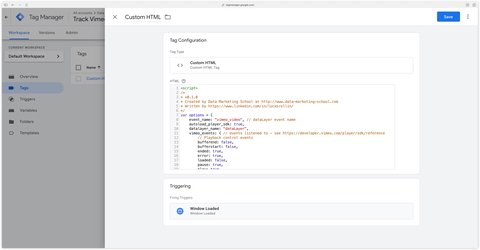
The listener contains an options object that lets you modify the following parameters:
| Parameter name | Explanations | Default value |
|---|---|---|
event_name | Name of event sent to dataLayer. | vimeo_video |
autoload_player_sdk | Automatic injection of the Vimeo Player SDK, essential for listener operation. If you set this parameter to false, be sure to load the Player SDK on your site in addition to your Vimeo videos. | true |
datalayer_name | If Google Tag Manager listens to customDataLayer instead of dataLayer enter customDataLayer in this parameter. | dataLayer |
logging | Allows you to log messages to the console. | true |
vimeo_events | Events that the Player SDK can listen to from a Vimeo video (full events reference). You can enable the events you want to listen to by setting them to true. | Events enabled by default: play, pause, progress, seeked, ended, error |
The listener will push vimeo_video events (if you haven’t changed the configuration) into the dataLayer. Here’s an example with the play video_status, which indicates that the video has started:
dataLayer.push({
  event: "vimeo_video",
  video_provider: "vimeo",
  video_status: "play",
  video_duration: 46,
  video_current_time: 0,
  video_percent: 0,
  video_url: "https://vimeo.com/357274789",
  video_title: "Travis Scott - Made in America"
});
To obtain this information in Google Tag Manager and use it in a GA4 event tag, you need to create dataLayer variables. We’ll do this together for video_status and then you can do it for the other parameters.

To track your site’s Vimeo videos with GA4, you need to set up a GA4 event tag in Google Tag Manager.
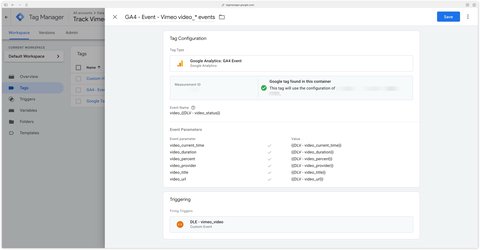
With the above configuration, the events sent to GA4 will be :
video_playvideo_pausevideo_progressOpen the GTM preview and check that your GA4 event tag is triggered on the vimeo_video data layer events.
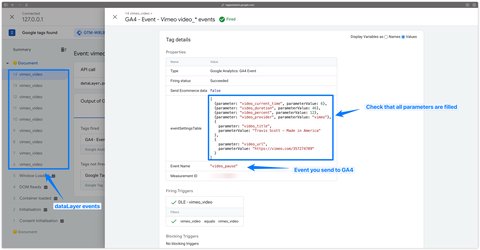
If you lazy load your Vimeo videos, the listener won’t recognize the Vimeo videos on the page because it will load before them.
To remedy this problem, you’ll need to call the function below each time a Vimeo video loads, or once all the Vimeo videos on the page have loaded.
window.reloadVimeoListener();If the logging parameter is set to true in your listener’s configuration, messages will appear in the console to help you understand what’s going on.
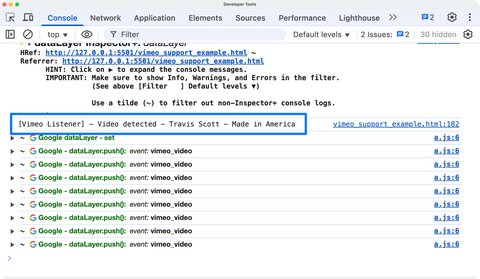
When the listener detects a video in the page, it will display the following message in the browser console.
[Vimeo Listener] - Video detected - {video_title}When the listener detects that the Player SDK is not loaded in the page, it will display the following message. You must therefore either :
autoload_player_sdk option in the listener<script src="https://player.vimeo.com/api/player.js"></script>) manually into the page[Vimeo Listener] - Player SDK needs to be added to the page. Enable options.autoload_player_sdkWhen the listener automatically adds the SDK Player script to the page, it will notify you. This happens when the SDK Player script is not already present on the page and you have enabled the autoload_player_sdk option in the listener configuration.
[Vimeo Listener] - Player SDK added to the pageA question about this article, need an audit of your setup or server-side migration? Drop me a line, I reply within 24h.
Guide to install the ChatGPT Ads Measurement Pixel with GTM using my OpenAI Ads Measurement Pixel by DMS tag: GA4 events, hashed user data, deduplication

Install Microsoft Clarity with Google Tag Manager in 10 minutes: official tag, Consent V2 (Axeptio, Didomi) and Smart Events.
Track Calendly meetings and retrieve your invitee's data (email, phone, UTM, payment, form answers) with my sGTM variable
 Lucas Rollin