


Title here
Summary here
Facing key advertising challenges? Take control of your tracking: audit, optimization, GDPR compliance, CMP, Consent Mode v2, and server-side tagging.
Contact Lucas or book a discovery callGoogle Tag Manager
Questions about this article?
Open it in your AI assistant to summarise it or apply it to your setup.
Tracking interactions with YouTube videos enables you to understand your visitors’ engagement and thus go beyond simple page views, clicks or scrolls in your analysis.
In particular, these interactions can help you determine whether visitors who watch your videos convert better than other visitors.
As YouTube and Google Tag Manager are both owned by Google, there’s a native trigger in GTM that lets you track interactions with YouTube videos on your site.
The trigger is called YouTube Video, and here’s how it works:
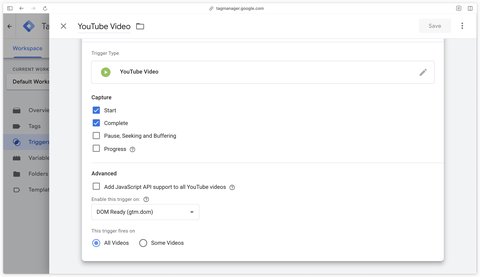
Explanations of the checkboxes in the Capture section:
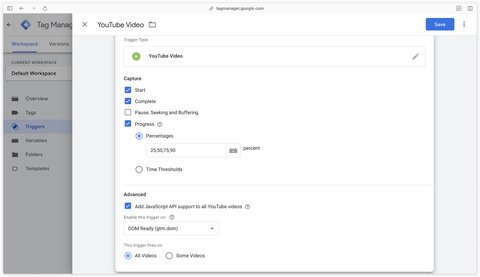
start)complete)pause or seek)Here’s how I recommend configuring the YouTube Video trigger in GTM:
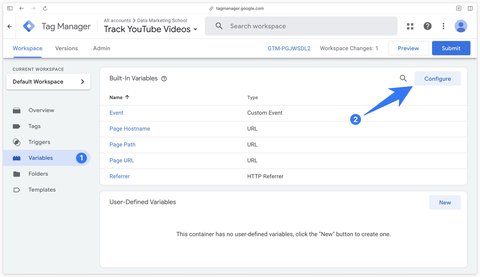
In the Variables section of Google Tag Manager, click on Configure.
Then check all the built-in variables in the Videos section.
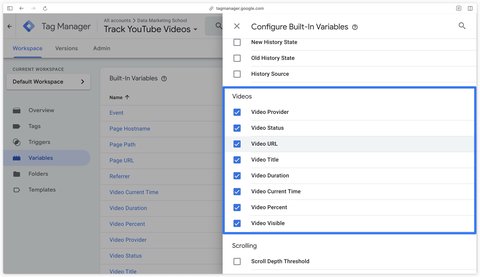
Explanations of built-in variables:
youtube)start, progress, pause, seek, complete)true if the video is visible on the visitor’s screen at the time of triggering, and false if the video is not visible (e.g. the visitor has played the video and then scrolled to the bottom of the page, or the visitor is on another tab during playback).Note that built-in variables will always be available regardless of how you configured the trigger in the Capture section.
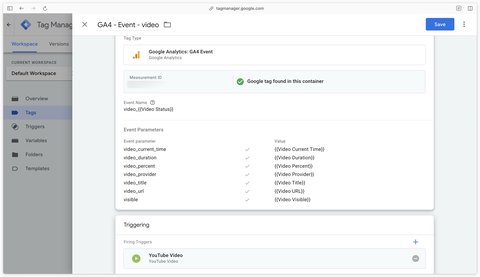
In the GA4 tag, we’ll use the video_start, video_progress and video_complete events.
Then trigger the tag on the previously created YouTube Video trigger.
The Javascript API makes it possible to track YouTube videos even if they are deferred loading by the website.
Enabling the Javascript API will add enablejsapi=1 to the src attribute of the YouTube video iframe, thus loading the https://www.youtube.com/iframe_api script. If the video is playing when the YouTube Video trigger loads, the video will reload to add this parameter and thus activate the Javascript API.
You can therefore check the box Add JavaScript API support to all YouTube videos in the YouTube Video trigger in GTM or add it manually in your website code on Youtube iframes.
A question about this article, need an audit of your setup or server-side migration? Drop me a line, I reply within 24h.
Prefer to talk it through? Book a discovery call →

Guide to install the ChatGPT Ads Measurement Pixel with GTM using my OpenAI Ads Measurement Pixel by DMS tag: GA4 events, hashed user data, …

Install Microsoft Clarity with Google Tag Manager in 10 minutes: official tag, Consent V2 (Axeptio, Didomi) and Smart Events.

Track Calendly meetings and retrieve your invitee's data (email, phone, UTM, payment, form answers) with my sGTM variable

Comments
Join the discussion
A question, some feedback, a specific case? Leave a comment: I reply to every one.