Title here
Summary here
Facing key advertising challenges? Take control of your tracking: audit, optimization, GDPR compliance, CMP, Consent Mode v2, and server-side tagging.
Contact LucasUpdated: Saturday, August 29, 2026
Between analytics tools, advertising platforms and marketing solutions, a website can quickly accumulate a large number of tags. Managing them then becomes more complex, especially when several teams work on tracking! In this article, we will look at how a Tag Management System works, when to use one and which criteria to consider in order to choose the right solution.
In short
A TMS helps you centralize and better manage the tags used on a website, and I explain everything in this article!
Before discussing its benefits, you first need to understand what a TMS is and the role it plays in managing a website’s data.
A Tag Management System, also called a TMS, is a tool that lets you centralize the management of the tags present on a website or an application. These tags are small snippets of code used to send information to various platforms, such as Google Analytics, Google Ads, Meta Ads or conversion measurement tools.
In practice, instead of adding each tag directly into the website’s code, teams use a single interface to create, edit and organize their tags. The TMS therefore acts as an intermediary between the website and the various data collection solutions.
For example, a company can use a TMS to track:
Each tag is associated with firing rules: a tag can fire only when a user views a specific page, clicks on an element or performs a particular action. The TMS therefore makes auditing and managing your tracking easier, but it does not replace analytics tools. Its main purpose is to send the right data, at the right time, to the right platforms.
A TMS typically works by adding a single container to the website’s code. Once this container is installed, the various tags are configured from the Tag Management System’s interface, without having to edit each page of the website directly.
Each tag then relies on three main elements:
Let’s take a concrete example:
A B2B company wants to measure the quote requests sent through its contact form. In its TMS, it sets up a tag that sends an event to Google Analytics 4 when a form is successfully submitted.
The trigger must be precise enough to avoid counting a simple click on the submit button or an attempt that contains an error. It can, for example, fire only after a confirmation message or a thank-you page is displayed.
Parameters can then enrich the event with useful information, such as the page from which the request was sent, the type of form used, the service category concerned or the traffic source. This data then makes it possible to analyze conversions in more detail and to identify the campaigns that generate the most relevant leads.
My advice
Document each tag, its purpose and its firing conditions. This good practice makes tracking maintenance easier and prevents a container from becoming hard to understand over time!
These terms are often used together, but they do not mean exactly the same thing:
The process can be summarized as follows:
Let’s go back to the quote request example:
The visitor submits the form on the website, the TMS fires the tag set up for this action and Google Analytics 4 then records the event in its reports. Each tool therefore comes into play at a different stage of the collection process.
A TMS should also not be confused with a CMP, or Consent Management Platform. The CMP collects and transmits the user’s consent choices, while the TMS applies the firing rules defined according to those choices. Both solutions must therefore be properly integrated to ensure consistent and compliant data collection.
Once you understand how a Tag Management System works, it remains to be seen what it concretely brings to tracking management and under which conditions it becomes truly useful.
The first benefit of a TMS is obviously the ability to centralize tag management in a single interface. Instead of editing the website’s code for each new integration, teams can configure their tags, triggers and variables from the same tool. This organization simplifies tracking maintenance and reduces the number of technical interventions required!
For marketing teams, this saves time when launching a campaign or setting up a new tool. An advertising tag can be added, tested and published faster, without systematically waiting for a full production release of the website.
Technical teams nevertheless keep an essential role. They step in to install the container, structure the data layer, secure integrations and check that the collected information is reliable. The TMS therefore does not remove collaboration between teams: above all, it makes it possible to distribute responsibilities more effectively.
Among the main benefits of a Tag Management System, we find:
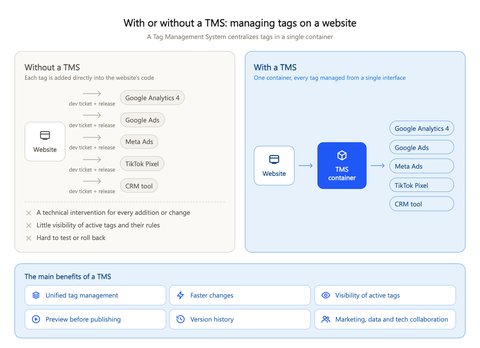
A TMS can also improve the quality of data collection. When naming conventions, variables and firing rules are well defined, it becomes easier to maintain consistent tracking across all pages of the website.
Let’s take the case of a company that launches several advertising campaigns during the year:
Be careful, however: this does not mean that every change should be made without technical validation. The most sensitive configurations, such as collecting conversion data, consent or server-side setups, still require rigorous checks.
Good to know
A TMS brings the most value when the website uses several analytics, advertising or marketing tools. On a very simple website with few tags, the gain may be more limited.
A TMS simplifies tag management, but it does not guarantee reliable tracking on its own.
A poor configuration can cause duplicates, incorrect firing or the sending of incomplete data to analytics tools. The main risk often comes from the accumulation of tags.
Over time, several tags may perform the same function, remain active after the end of a campaign or fire on pages that are no longer relevant. This situation complicates maintenance and can also affect the website’s performance.
Tracking quality also depends on the structure put in place upstream. Without a clear tagging plan, naming conventions and documentation, the container can quickly become hard to understand. Each new change then increases the risk of error.
To keep a TMS clean and reliable, several good practices should be followed:
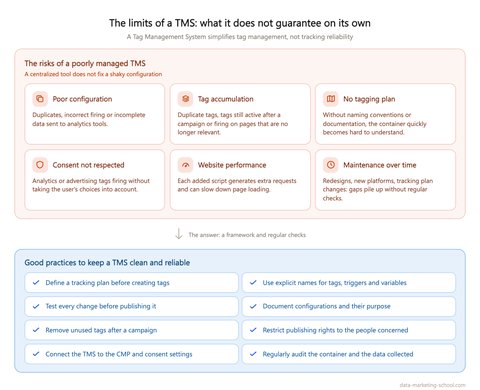
Compliance must also be built in from the configuration stage! Advertising or analytics tags must not fire without respecting the user’s consent choices. The TMS must therefore be properly connected to the CMP and to the consent settings defined on the website.
The number of tags can also affect page load time. Even if the TMS groups their management in one place, each added script can generate additional requests. It therefore remains necessary to check the usefulness of each integration and to avoid keeping tags that are no longer used.
My advice
Plan a regular TMS audit, especially after a website redesign, a change to the tracking plan or the addition of new platforms. This helps you spot obsolete tags, firing errors and gaps between the expected data and the data actually collected.
Do you need help auditing, fixing or optimizing your configuration? As a freelance Google Tag Manager consultant, I can support you with auditing your tagging plan, configuring tags, ensuring compliance with your CMP and Consent Mode v2, as well as server-side tracking. Feel free to contact me through the form on my website so we can discuss your needs!
There are several Tag Management System solutions on the market. Some are free and relatively easy to get started with, while others are aimed more at large companies that need to manage a large number of websites, markets or users.
Among the best-known solutions are Google Tag Manager, Adobe Experience Platform Tags, Tealium iQ, Tag Commander and Matomo Tag Manager. However, the choice should not be based solely on the tool’s popularity. The right solution is above all the one that matches your technical needs, your organization and your level of data maturity.
Several criteria can be examined before choosing a TMS:
For a website that is just getting started with tag management, an accessible solution with extensive documentation may be enough. Conversely, a company that runs several websites, works with many partners and must apply precise governance rules will need a more advanced tool.
The skills available in-house must also be taken into account. A simplified interface does not exempt you from understanding how tags, triggers, variables and the data layer work. Without this mastery, even the most complete TMS can produce unreliable data collection!
Finally, the choice depends on the tracking architecture you have in mind. If you only want to manage a few client-side tags, your needs will remain relatively simple. If your goal is to further centralize collection, improve control over the data sent to platforms or move to server-side, you will need to check that the chosen solution can support this evolution.
Good to know
Switching TMS can require significant migration, testing and documentation work. It is therefore best to assess your current needs from the outset, as well as the possible evolutions of your tracking over the coming years.
A Tag Management System makes tag management easier and helps structure data collection on a website more effectively. Its value, however, depends on the quality of the tracking plan, the configuration put in place and the checks carried out over time.
Used properly, a TMS becomes a true central hub between your website, your analytics tools and your marketing platforms. It nevertheless remains essential to document configurations, respect users’ consent choices and carry out regular audits to keep your tracking reliable.
A question about this article, need an audit of your setup or server-side migration? Drop me a line, I reply within 24h.

Marketing attribution splits the credit for a conversion between the touchpoints of the customer journey. Discover the models, the data and the tools you need to get a reliable reading of your channels.
A tracking audit helps you check whether your data is consistent and usable. Here is the complete checklist to control the quality of your collection.
 Lucas Rollin