Title here
Summary here
Facing key advertising challenges? Take control of your tracking: audit, optimization, GDPR compliance, CMP, Consent Mode v2, and server-side tagging.
Contact LucasA label connects fans and artists by offering services for the creation, manufacture, distribution and promotion of merchandising products. The scope of this mission concerns the shop of a French artist you probably know.
This client prefers to remain anonymous for reasons of confidentiality.
The objectives of this mission are:

Meta Ads

Tiktok Ads

Snapchat Ads

Google Ads

Google Analytics 4
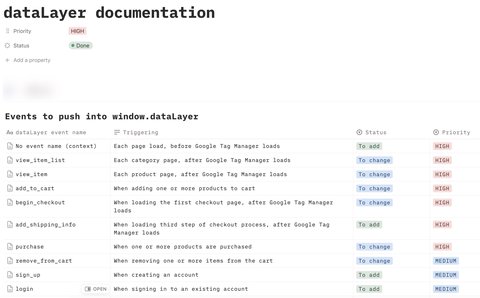
Correctly implementing the dataLayer is the most important step in a tagging plan integration project, because the dataLayer represents the source of the data that will then feed all the tools you use.
This site is not installed on a CMS (Content Management Software), it’s a custom site. This means that it is not possible to use a dataLayer extension or plugin that could set up the dataLayer automatically with a few clicks.
It is therefore necessary to provide developers with technical documentation on how to set up the dataLayer.
Precision and confidence
The dataLayer documentation must be precise enough to leave no grey areas for developers. Precise documentation and mutual trust with the developers are the two essential ingredients for a rapid and successful dataLayer release.
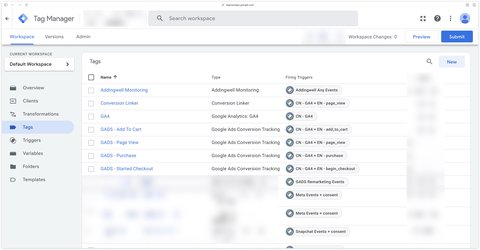
Once the dataLayer is in place, all that remains is to configure Google Tag Manager Web with the right triggers and tags. As this is a server-side setup, the bulk of the work lies in configuring the GA4 data stream that is sent to the server.
The GA4 data stream
The quality of the GA4 data stream depends on the dataLayer and also on the configuration in Google Tag Manager Web. This data stream is critical as any misconfiguration will negatively impact all platforms you connect to on the server side.
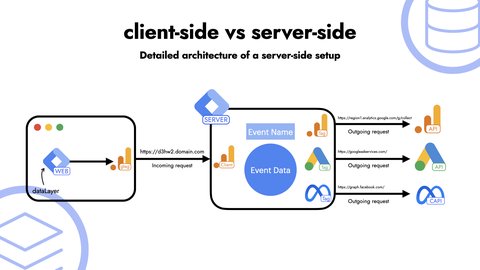
Once the GA4 data stream configuration is complete, it’s time to set up server-side tagging with Addingwell. Addingwell is the platform that hosts the Google Tag Manager server container. It’s in this Google Tag Manager server container that there’s still some configuration work to be done.
It is necessary to configure the tags (Meta, Tiktok, Snapchat, Google Ads) in order to send the data to all the advertising platforms used by the label. It is also necessary to configure the tags for Google Analytics 4 in order to send the data to the GA4 property.
The advantages I see in using Addingwell for this project are:
Product feed synchronization is an important step in this project, as it enables us to feed the shop’s product data to the advertising platforms. Channable is the platform used for this synchronization.
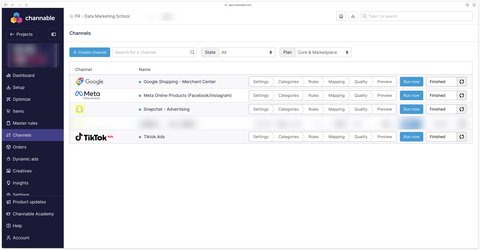
Channable is a feed management platform that (among other things) connects an e-commerce site’s product data to various advertising platforms. Channable retrieves product data from the shop, transforms it and sends it to the advertising platforms.
This makes it possible to create dynamic advertising campaigns (Dynamic Ads) on Meta, Tiktok, Snapchat and Google Ads using the shop’s product data.
As part of my mission, the post-setup monitoring and support stage is very important. We need to make sure that the tracking is working properly and that the data is being sent to the various advertising platforms. It’s also necessary to make adjustments and to answer any questions the customer may have throughout the mission.
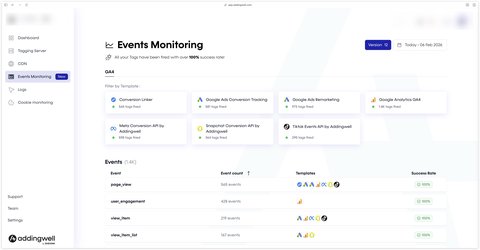
This is where Addingwell’s monitoring interface comes in very handy, as it allows you to view the data being sent to the various advertising platforms in real time, and quickly detect any problems. Advanced logs can also be requested from Addingwell support to go even deeper into the debugging of a tracking issue.
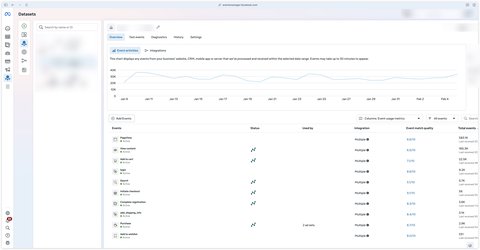
Addingwell monitoring isn’t enough, however, as the data must be correctly fed back to the various connected platforms, such as Meta’s event manager.
The implementation of server-side tagging has enabled us to :
This solid foundation now enables the label to optimize its advertising campaigns with reliable data, and look forward to the deployment of new marketing strategies.
A question about this article, need an audit of your setup or server-side migration? Drop me a line, I reply within 24h.

myBlend achieved +200% revenue growth in a single year.
+9% on purchasing events in Meta.
 Lucas Rollin